
The privileged access management (PAM) market is consolidating. Acquisitions are bringing standalone security products into larger platforms, often changing the licensing, support and product strategies that customers originally signed up for.
Sometimes these changes benefit customers. Other times, they bring higher costs, more complicated licensing or uncertainty about a product’s future. For organizations whose PAM vendor has been acquired, it may be a good time to reevaluate their investment.
But switching vendors takes planning. A successful privileged access management (PAM) migration involves much more than deploying new software. PAM controls access to critical systems, privileged credentials and administrative workflows. You can’t simply turn off one platform when its license expires and expect a replacement to be ready.
Organizations should begin planning a PAM migration at least six to eight months before their current contract expires. Larger enterprises with extensive integrations, thousands of privileged accounts or complex compliance requirements may need a year or more.
Here’s how to prepare.
Sample PAM Migration Timeline
*Remember, this is a planning framework and each company’s needs are different. Discovery, procurement, testing and migration planning will often overlap. Contractual notice deadlines may also occur well before the renewal date.
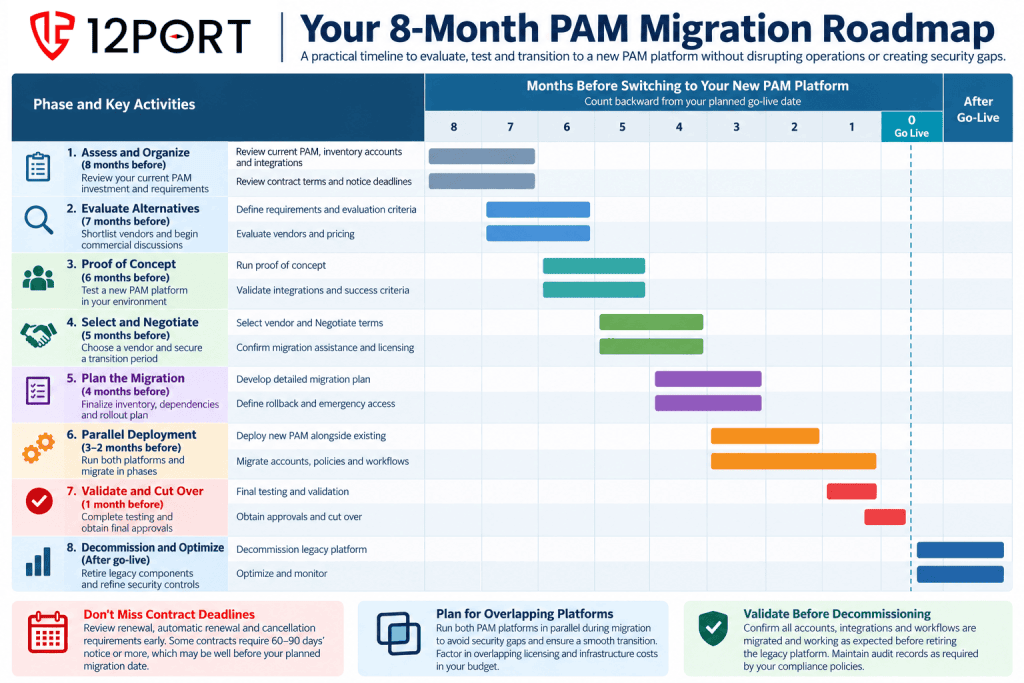
6-8 Months Out: Assess Your Current PAM Investment
Start by understanding what your current PAM platform delivers and where it may be falling short.
Consider whether licensing costs, support quality or product direction have changed. Review the infrastructure required to operate the solution and identify capabilities you no longer use or new requirements it cannot easily address.
Review your current contract. Identify renewal dates, automatic renewal provisions, termination requirements and notice periods. Some contracts require 60–90 days’ notice or more, meaning your real decision deadline may arrive months before expiration.
Bring together security, IT operations, infrastructure, compliance and procurement. Assign a migration owner and begin inventorying privileged accounts, critical systems, administrative workflows and integrations.
Don’t assume you need to recreate every configuration. A migration is an opportunity to eliminate unused accounts, simplify policies and rethink how privileged access should work.
6-7 Months Out: Evaluate PAM vendors and Start Commercial Discussions
Develop a shortlist of privileged access management vendors based on your current and future requirements.
Look beyond features. Consider deployment architecture, administrative experience, infrastructure requirements, total cost of ownership and vendor support.
Does the solution require endpoint agents or additional servers? Can administrators continue using familiar tools? Will it support your existing infrastructure and new requirements without multiple additional products?
Start commercial discussions with your incumbent vendor now. Request renewal pricing, understand your options and explore short-term extensions that could provide additional migration time.
An extension may cost less than rushing a transition that affects critical systems. Don’t wait until your current contract is about to expire to begin negotiating.
6 Months Out: Request a Proof of Concept
A proof of concept (POC) should demonstrate that the new PAM platform works in your environment, not just in a vendor’s demonstration lab.
Start with a simple use case, such as providing an administrator with secure RDP or SSH access to a non-production server.
Test the fundamentals:
- User authentication and MFA
- Privileged access without exposing credentials
- Session recording and auditing
- Access policies and approval workflows
- Integration with existing identity and security tools
- Deployment complexity and administrator experience
Define success criteria before testing begins and evaluate vendors consistently.
Use the POC to evaluate support, too. How quickly does the vendor respond? Are knowledgeable engineers available? Can they help troubleshoot integrations and map existing workflows?
Ask what migration assistance is included and whether additional professional services will be required. The experience during a POC can tell you a great deal about the relationship after the sale.
5 Months Out: Select Your Vendor and Secure the Transition
With POC results in hand, select the platform that best meets your security, operational and financial requirements.
Confirm licensing, implementation costs, migration assistance and support commitments before signing.
Just as importantly, finalize your transition arrangements with the incumbent vendor. Ensure you have sufficient time to operate both platforms while migrating critical systems.
Get any extension agreements in writing. The goal is to maintain control over the migration schedule rather than allow an expiring license to dictate when you must cut over.
4 Months Out: Build the Detailed Migration Plan
By now, your initial inventory should be complete. Use it to develop a phased migration plan.
Identify privileged accounts, credentials, applications, service accounts, integrations and administrative workflows. Look for undocumented dependencies, including credentials embedded in scripts or applications.
Determine how existing vault data, policies and configurations can be transferred. Some information may require manual recreation, and proprietary formats or encrypted records may not be exportable.
A practical migration sequence might be:
- Non-production servers and basic administrative access
- Standard Windows and Linux server access
- Third-party and remote administrator access
- Credential vaulting and rotation, beginning with low-risk accounts
- Applications, automation and complex workflows
- Business-critical systems and specialized integrations
Establish acceptance criteria and rollback procedures for each phase.
Before expanding into production, validate the new platform’s administrative permissions, security configuration and emergency recovery procedures.
Involve administrators early. Training, communication and user feedback are essential to a successful transition.
3–2 Months Out: Run Both PAM Platforms in Parallel
Parallel operation is one of the most important parts of a PAM migration.
Keep your existing PAM platform operational while deploying the replacement in controlled phases. Start with the use cases validated during the POC and gradually expand.
For each group of systems, test the complete workflow, including authentication, approvals, session recording, audit logs and administrator usability.
Credential rotation requires particular care. Assign one platform as the designated rotation owner for each credential. Two systems independently changing the same password can disrupt access and potentially lock out critical accounts.
Maintain approved rollback and emergency access procedures throughout the transition.
As deployment expands, test failure scenarios such as network interruptions, authentication problems, credential rotation failures and disaster recovery.
Continue evaluating vendor support. Migration assistance should include troubleshooting, configuration guidance and help resolving unexpected compatibility issues.
If complex workflows require additional time, extend the overlap rather than compromise security or availability.
1 Month Out: Validate and Complete the Transition
By the final month, most planned systems should be operating through the new PAM platform.
Focus on remaining critical workflows, administrator acceptance and compliance requirements.
Preserve your audit history. Determine which session recordings and logs must be retained under applicable regulations, contractual obligations and internal policies. Confirm they can be exported, archived and retrieved when needed.
If historical records cannot be transferred, you may need to maintain limited access to the legacy platform for audit purposes.
Before decommissioning, confirm:
- All required privileged access workflows have been migrated and tested.
- Credential ownership and rotation have been transferred.
- Emergency access and recovery procedures work.
- Historical audit records remain accessible as required.
- Security, operations and compliance teams have approved the transition.
Only then should you retire legacy access paths and integrations. If critical requirements remain unresolved, extend the transition period.
After Cutover: Decommission and Optimize
The migration isn’t finished when administrators begin using the new platform.
Retire the legacy environment according to your approved plan, remove unnecessary access, revoke obsolete credentials and confirm that remaining integrations no longer depend on the old solution.
Then evaluate the results.
Measure privileged access coverage, credential rotation, audit completeness, administrative efficiency and support requirements. Gather feedback from users and identify opportunities to simplify policies or extend protection to previously unmanaged systems.
The Right PAM Vendor Should Make Migration Easier
Switching PAM vendors is a significant decision, but it doesn’t have to mean a disruptive, all-at-once replacement.
Starting early, proving the technology with a manageable use case and migrating gradually can help organizations maintain security while transitioning to a new platform.
The vendor you select matters just as much as the technology. Look for a provider that understands your environment, helps resolve technical challenges and supports your team throughout the migration.
With acquisitions continuing to reshape the PAM market, organizations have an opportunity to reconsider whether their current solutions still meet their needs.
If you’re thinking about switching PAM vendors, don’t wait until your existing contract is about to expire.
Get the Full Plan
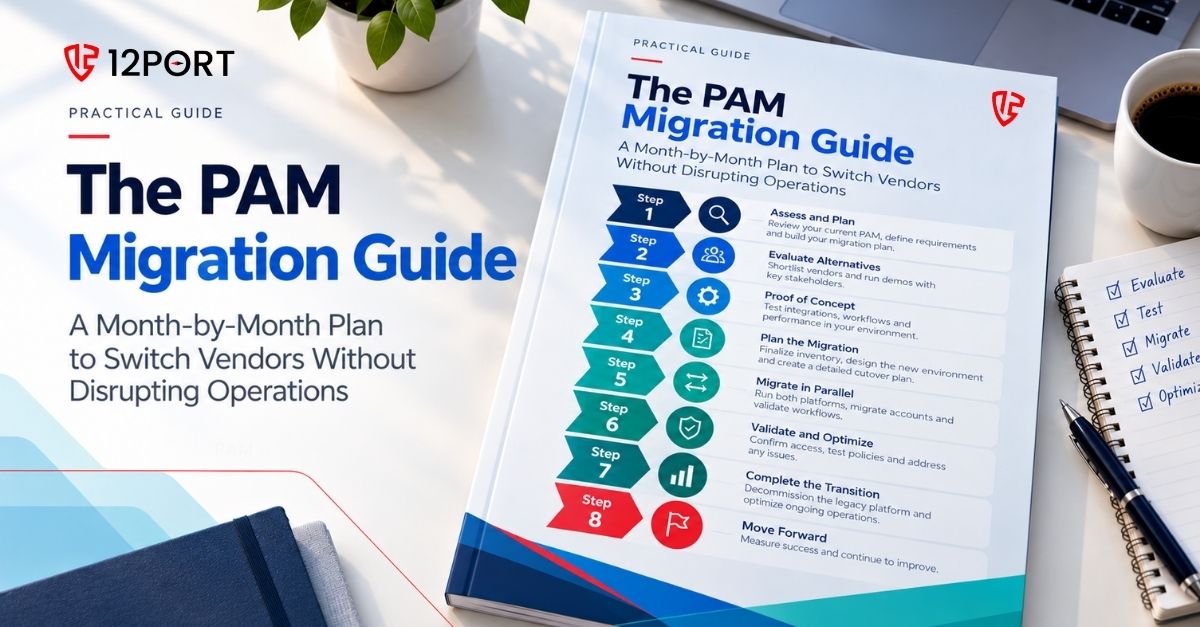
We turned this timeline into The PAM Migration Guide. It has 12 steps with a test for each, a ten-move runbook for every cutover, the seven ways migrations fail and the checklists to retire the old system safely. It is vendor-neutral and there is no form. Read it online or download the PDF.
Considering a Move to 12Port?
12Port was built from the ground up as a modern, agentless PAM platform designed to simplify privileged access security. It brokers secure access without exposing credentials and supports familiar administrative workflows across on-premises, cloud and isolated environments.
Its agentless architecture can help reduce the infrastructure and deployment complexity associated with introducing a new PAM solution. Organizations can begin with a focused use case, validate the technology in their own environment and expand deployment alongside an existing PAM platform.
Thinking about replacing your PAM solution? Contact 12Port for a free trial or to discuss a proof of concept and your migration requirements.
See 12Port for yourself
Drop your work email and we will reach out.
No spam. One follow-up, that’s it.